 انتقل إلى المحتوى
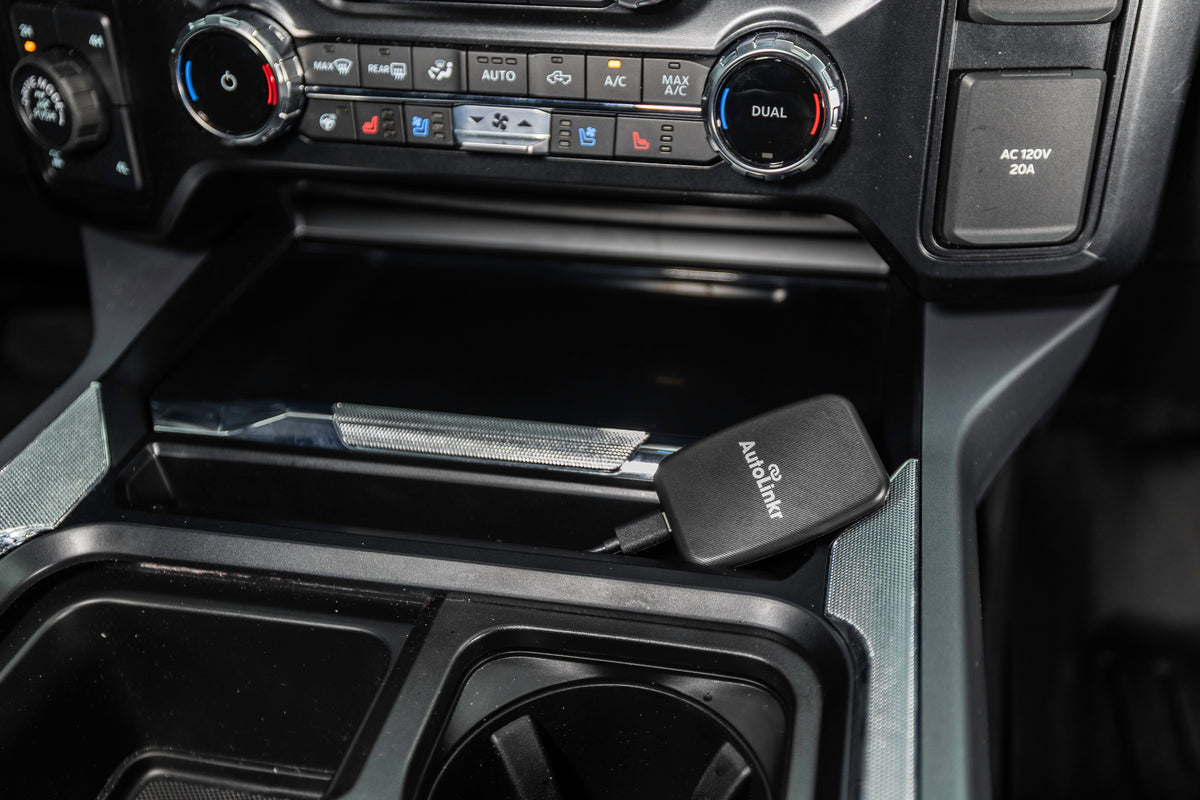
Short answer: Apple CarPlay does not include Netflix, and Apple does not allow video apps in CarPlay. The reliable way to watch Netflix on a CarPlay screen in 2026 is a streaming CarPlay adapter such as the AutoLinkr Pro™ or AutoLinkr Elite™. It plugs into the USB port your car already uses for CarPlay, runs its own Android system with the Google Play Store, and plays Netflix, YouTube, Disney+ and Hulu on the factory display, while still giving you wireless CarPlay and Android Auto for navigation and music.
Why doesn't CarPlay have Netflix?
CarPlay is a projection of a limited set of iPhone apps: navigation, audio, messaging and a few car-specific categories. Apple blocks video playback apps for driver-distraction reasons, so there is no Netflix, YouTube or Disney+ app for CarPlay and there never has been. The same is true of Android Auto. If a product promises "Netflix on CarPlay," it is doing one of three things:
- Running its own Android computer that outputs to your car screen through the CarPlay port (this is what AutoLinkr Pro™ and Elite™ do).
- Mirroring your phone screen to the display (what the AutoLinkr Lite™ does). Netflix blocks mirrored playback with DRM, so mirroring works for YouTube and most apps but not Netflix.
- Replacing the head unit with an aftermarket Android stereo, which costs far more and usually needs professional installation.
How to watch Netflix on CarPlay with AutoLinkr Pro™ (60-second setup)
- Plug the adapter in. Use the USB port your car uses for wired CarPlay or Android Auto. Both USB-A and USB-C cables are in the box.
- Let the car boot the adapter. Your screen switches to the AutoLinkr home screen in about 30 seconds.
- Turn on your phone's hotspot (Personal Hotspot on iPhone) or connect the adapter to any Wi-Fi network. Streaming uses your phone's data plan, like any other device.
- Open Netflix from the Google Play Store on the adapter, sign in, and press play. Audio comes through the car speakers.
- Pair once for wireless CarPlay. Tap the CarPlay icon, pair your iPhone over Bluetooth, and from then on it connects automatically every drive.
No tools, no wiring, no mechanic. The adapter draws power from the USB port and switches off with the car, so it cannot drain the battery.
Which AutoLinkr adapter do you need for Netflix?
| Model | Netflix | YouTube | Wireless CarPlay / Android Auto | Split-screen (Maps + Netflix) | Price |
|---|---|---|---|---|---|
| AutoLinkr Lite™ | No (DRM blocks mirroring) | Yes, via screen mirroring | Yes | No | $49.99 |
| AutoLinkr Pro™ | Yes | Yes | Yes | No | $89.99 |
| AutoLinkr Elite™ | Yes | Yes | Yes | Yes | $199.99 |
| AutoLinkr Tablet™ (for cars without CarPlay) | Yes | Yes | Yes, on its own 7" screen | No | $74.99 |
For most drivers the Pro™ is the right pick: it has Netflix, YouTube, Disney+, Hulu and the full Play Store, 2GB of RAM and a microSD slot for offline downloads. Choose the Elite™ if you want navigation on one half of the screen while a show plays on the other, plus 4GB of RAM, 64GB of storage and a faster processor.
Does streaming Netflix in the car use a lot of data?
Netflix uses roughly 1GB per hour at standard definition and about 3GB per hour in HD. Two ways to keep usage low:
- Set Netflix's Mobile Data Usage to "Save Data" inside the app on the adapter.
- Download episodes to the adapter's microSD card at home over Wi-Fi, then play them offline on the road. Pro™ supports cards up to 128GB.
Is it legal to watch Netflix on a car screen?
Video on the dashboard is intended for passengers and for when the vehicle is parked. Most US states prohibit video that is visible to the driver while the vehicle is moving. AutoLinkr adapters do not lock playback, so the responsibility for safe, legal use rests with the driver. Keep the video for the kids in the back seat, the drive-through line, charging stops and campsites.
Will it work in my car?
AutoLinkr Pro™ and Elite™ work with any car or aftermarket stereo that already has Apple CarPlay or Android Auto, wired or wireless. That covers about 97% of vehicles built since 2016 across Toyota, Honda, Ford, Chevrolet, RAM, GMC, Hyundai, Kia, Nissan, Subaru, Mazda, Volkswagen, Audi, Mercedes-Benz and 30+ more brands. They are not compatible with Tesla, Rivian, Lucid, Polestar, NIO or BMW models from 2019 onward. If your car has no CarPlay at all, the standalone AutoLinkr Tablet™ adds a 7-inch CarPlay and streaming screen to any vehicle with a 12V socket. Check your exact model on the compatibility page.
Frequently asked questions
Can I watch Netflix on CarPlay without an adapter?
No. Apple does not permit video apps in CarPlay, and jailbreak workarounds are unstable and void your phone warranty. An adapter is the only dependable method.
Does the adapter work with Android phones too?
Yes. The same device provides wireless Android Auto for Android phones and wireless CarPlay for iPhones, and streaming works regardless of which phone you carry.
Do I still get Apple Maps, Siri and my steering-wheel buttons?
Yes. CarPlay runs inside the adapter exactly as it did before, so Apple Maps, Siri, voice commands and steering-wheel controls all keep working.
What if it doesn't work in my car?
You have 30 days from delivery to return it for store credit, no reason required, and every device carries a 1-year warranty against defects.
Ready to upgrade? Shop AutoLinkr Pro™ or compare it with the Elite™.
مشاركة:
How to Watch YouTube on Your Car Screen (CarPlay & Android Auto)